For PAGE_FAULT_IN_NONPAGED_AREA in Windows 11, record the exact stop code, any named .sys file and the change just before the crashes began. This is bug check 0x50: Windows referenced invalid system memory. Start with the relevant driver, software or hardware change; the word "memory" doesn't identify a failed RAM stick.
I'd preserve the crash evidence before changing the page file or updating every driver. If Windows is usable, back up important files and choose one branch below. If it crashes before sign-in, use the recovery branch rather than repeatedly forcing another normal startup.
Confirm the code and when it happens
Microsoft's 0x50 reference describes an invalid or freed memory address. It lists faulty driver code, a system service, antivirus software, a corrupted NTFS volume and hardware failures among possible causes. Adding RAM or enlarging the page file isn't a diagnosis of that address failure.
Save the stop-code text, crash time, Windows version, activity and any driver filename. Note whether it happens during startup, after sleep or when one game or device is used. Microsoft's stop-error guide distinguishes the code from the executing module; a blue or black screen depends on the Windows version and doesn't identify the cause.
If a viewer highlights ntoskrnl.exe, use the kernel-name and crash-context checks before blaming that file. If the actual code is MEMORY_MANAGEMENT, follow the separate 0x1A investigation. Keep each crash's real code instead of combining all memory-related failures under one label.
Choose one branch from the evidence
| Observation | Next useful check |
|---|---|
| One driver changed just before the crashes, or a repeated report names it | Identify its device and installed version. Use an approved vendor update or a justified rollback. |
| New RAM, changed memory settings or a diagnostic error | Check the supported configuration and run or preserve the memory diagnostic. |
| Disk errors, failed copies or a drive-health warning accompany 0x50 | Protect data and ask the drive or PC vendor for the appropriate storage diagnostic. |
| A new security tool or other low-level service coincides with the first crash | Give its vendor or IT the version, timeline and crash evidence before changing protection. |
| Windows crashes before you can reach a usable session | Use the recovery route or manufacturer diagnostics; desktop-only repair steps aren't available yet. |
A recent change is a lead to compare, not proof of causation. Record the original version or setting, make one supported change and check the ordinary activity that previously failed. A short quiet session doesn't establish that an intermittent crash is resolved.
Check the relevant driver or software change
If a driver is named, identify its publisher and device before selecting a package. Don't download a loose replacement .sys file or rename the existing driver. For an update, use Windows Update or the hardware vendor's official package matching the exact model, Windows version and architecture.
When the crashes began after that device's driver update, save work before a rollback. Microsoft's driver rollback procedure requires administrator permissions:
- Right-click Start and open Device Manager.
- Expand the affected category, identify the device, then open its Properties > Driver tab.
- Select Roll Back Driver, choose a reason and select Yes. Restart if prompted.
- Repeat the usual task and record whether the same 0x50 returns, including any new named driver.
If rollback isn't available, ask the vendor or IT for the approved package. Don't substitute a driver updater or change unrelated devices to fill that gap. A newly installed antivirus, VPN, virtualization product or system utility needs its own support route; keep a managed PC's security controls in place while IT investigates.
Test memory when that branch fits
Microsoft includes Windows Memory Diagnostic in its 0x50 guidance. Save open work first: the immediate option restarts the PC. Open Start, search for Windows Memory Diagnostic, then choose Restart now and check for problems. The second option schedules the check for the next startup.
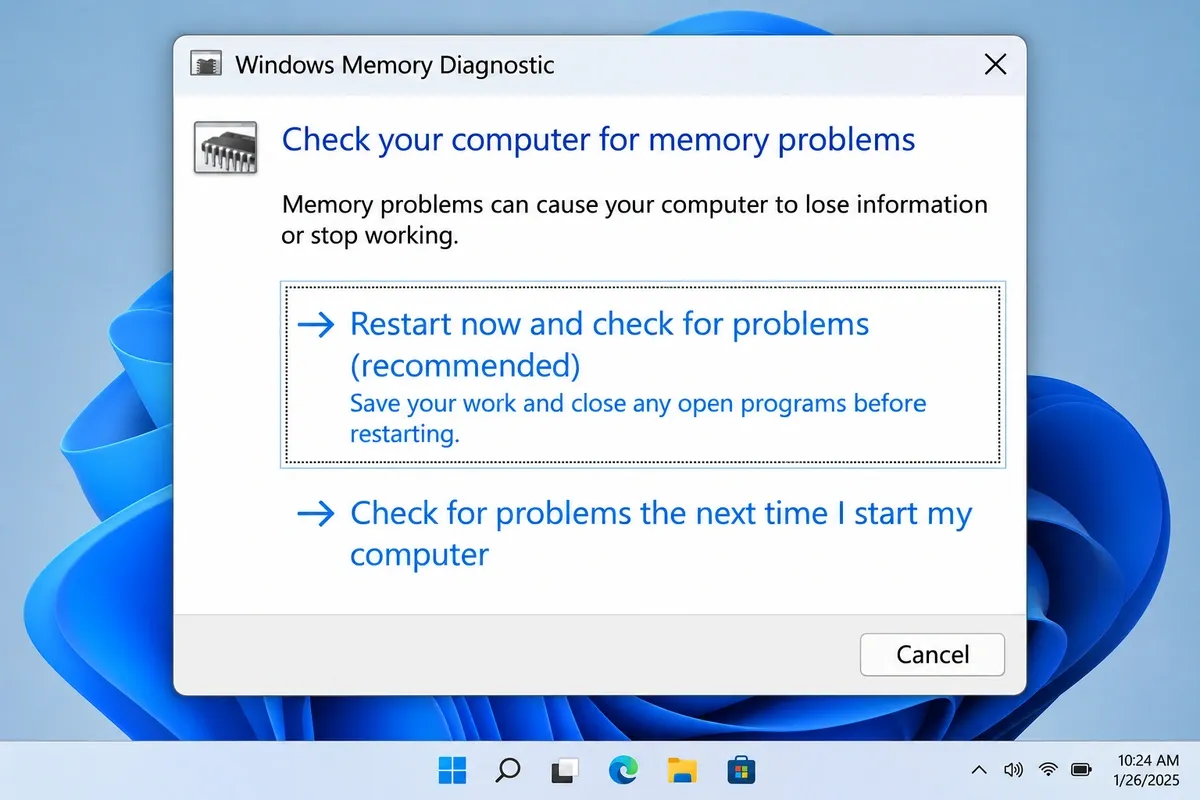
Allow the test to finish. After Windows returns, inspect Event Viewer > Windows Logs > System for the matching MemoryDiagnostics-Results entry. Match its time and read the message. An unfinished test or a missing notification isn't a completed clean result. If a completed test reports no errors but 0x50 returns, keep that report and continue with the driver, storage or dump evidence instead of calling the PC repaired.
If it reports problems, follow the memory-test result and service-handoff checks. Don't buy a particular DIMM from the warning alone. PassMark's memory-error explanation includes the CPU, caches, motherboard and compatibility among factors its tests exercise.
If you recently changed a memory profile or installed RAM, use the exact PC or motherboard manual to confirm the supported configuration. Record the setting before returning an identified tuning change to the manufacturer's supported standard value. Don't increase voltages or reset every firmware setting. Leave module removal and slot comparisons to the device's service procedure.
Use 0x50 parameters with the right limits
An existing dump can distinguish failures that share the same stop-code name. Microsoft's 0x50 reference documents !analyze -v for verbose analysis. That command belongs in WinDbg after opening a dump; it isn't a repair command for Terminal.
Preserve all four parameters: the referenced address, operation type, instruction address if known, and page-fault type. Parameter 2's operation values depend on the architecture and Windows generation. Don't decode a current Windows 11 dump using an old example's read/write values.
| Page-fault type and meaning | Useful limit |
|---|---|
| 0x0: The referenced page-table entry is marked free. | This describes the invalid reference; it doesn't name a physical RAM module. |
| 0x2: The address has no valid active page-table entry. | Use the stack and module context to investigate who referenced it. |
| 0x4: An illegal, non-canonical virtual address was referenced. | The address itself is invalid; changing page-file size isn't an explanation. |
| 0xF: Kernel code accessed a user-mode virtual address when that access wasn't allowed. | Preserve the dump for the responsible software or driver vendor. |
Compare available dumps for repeated code, module, stack and activity. Existing small dumps are commonly in %SystemRoot%\Minidump. Microsoft's small-dump guidance notes the limited information captured; an inconclusive file doesn't rule out a fault. Share dumps privately with trusted support because they can expose system information.
Follow storage evidence and reported outcomes
The 0x50 reference includes corrupted NTFS volumes as a possible cause. If copies fail, the drive reports a health warning or storage errors line up with the crash time, protect important files before repair writes. If the PC cannot copy them reliably, stop repeated attempts and arrange qualified recovery or service help. Use the drive or PC manufacturer's diagnostic for the exact model.
A Windows 10 motherboard-change report ended with the owner saying Windows worked on another disk; the earlier reinstall and reported memory test hadn't resolved it. A separate gaming-PC owner's visible update instead reported that new RAM fixed the crashes despite a clean memory-test report.
These are different systems and interventions. They show why the same code or one clean test doesn't justify one replacement for everyone. In an older spreadsheet-related 0x50 discussion, changing Office architecture was followed by another crash with a different stop code. That wasn't verified recovery. Keep the exact new error when a symptom changes.
Repair or recover with evidence preserved
For a usable Windows session without an unresolved hardware or storage warning, system-file repair is a separate check. Microsoft's System File Checker procedure runs DISM before SFC. Install applicable Windows updates and restart, then open Command Prompt as administrator. Run DISM.exe /Online /Cleanup-image /Restorehealth and wait for successful completion before sfc /scannow. These online commands target the running Windows installation; don't paste them into recovery Command Prompt expecting an offline repair. Record the result and check the original crash trigger afterward.
If Windows won't remain usable, have the BitLocker recovery key available privately before entering recovery on an encrypted device. Follow Microsoft's Safe Mode and recovery entry instructions. A PC that stays unstable outside normal Windows needs manufacturer diagnostics or support rather than repeated resets.
I wouldn't enable Driver Verifier on an everyday PC for this checklist. Microsoft's Verifier warning restricts it to testing and debugging systems because it can crash the computer. Give trusted support the exact 0x50 parameters, named module, crash times, recent-change record and diagnostic results. The startup and recovery hub connects the neighboring stop-code and startup routes.